
Release Notes November 5, 2025
In addition to performance improvements and bug fixes, the following visible updates were made:
Member Count Exclusion Filter
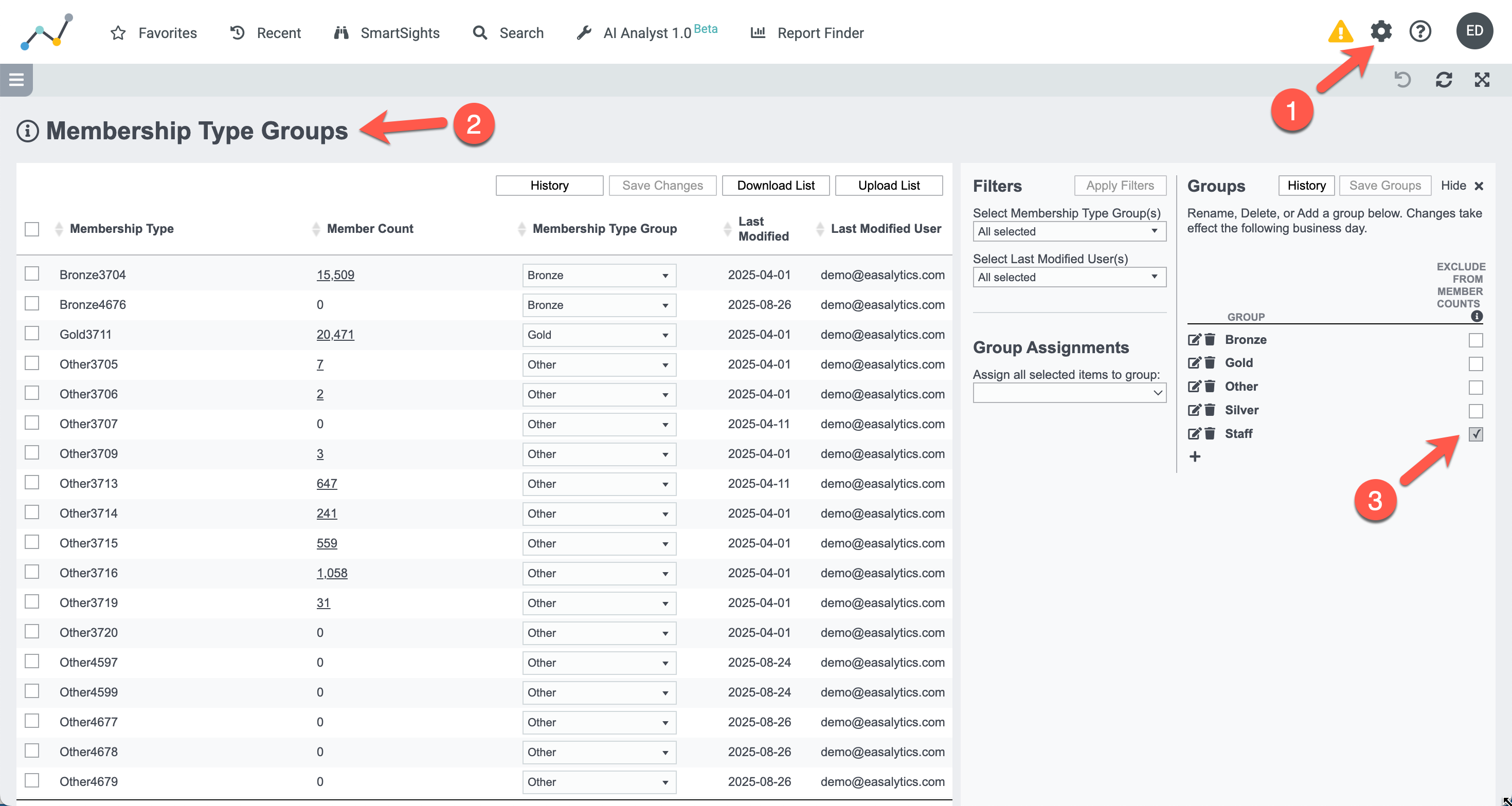
We've expanded our new Member Count Exclusion filter to all membership dashboards, including Member Mix, Membership Trends, Attrition Trends, Net Membership, and all of our membership Topline widgets. You can already find this filter on Leads Conversion, Salesperson Performance, Goals, and PT Scorecard dashboards.
By default, this filter excludes membership type groups you've flagged for exclusion in the Membership Type Group admin page (for example Staff as shown below). You can always choose to show all members in a dashboard, or update your excluded groups at any time. Note: this setting affects only member counts. Other metrics such as check-ins, classes, PT, revenue will include all members.
Leads Reporting Enhancements
For clients using our Daxko Engage Pro CRM integration, we've added new data capabilities to improve your lead conversion funnel across your clubs and Club Groupings.
New! Tour Conversion reporting
We're excited to introduce Tour data reporting for leads and members to Easalytics. In the Leads Conversion dashboard you can analyze total Tours given by club or salesperson, how many Tours lead to memberships in your target number of days, and what percent of your new members came from Tours. Use the Trends tabs to analyze tour performance over time.
You can also find Tours Given and Tour Conversion in our Salesperson Performance dashboard alongside New Members and PT Intro session conversion statistics.
New! Lead Goal Tracking
A new Lead Goal tab helps you visually track progress in the familiar style used in our Goals dashboards. You can set your Lead Goal as a percent of your New Member goal in the dashboard, and quickly see which clubs are ahead/behind goal month-to-date, or across any time.
PT EFT Draft Adjustment Setting
We're expanding the PT EFT Draft Adjustment control to all relevant homepage Topline Widgets and dashboards, including PT Sales Revenue and Enrollment, PT Sales Trends, Goals, Goals PT EFT Draft, and the PT Scorecard. It includes two settings:
All - Includes all sales transactions and cancellations without attempt to reconcile cancellations that occur due to a upgrade/downgrade rewrite. For example, if a member cancels a $200 agreement and rewrites a $300 agreement on the same day, this setting would show $200 in Cancelled EFT column and $300 in New EFT column, and a net of +$100. If a member cancels a $200 agreement and rewrites a $100 agreement on the same day, it would show $200 in Cancelled EFT column and $100 in New EFT column, and a net of -$100
Adjusted for Cancels and Rewrites - Removes cancellation amount from the Cancelled EFT column if the member writes a larger new agreement, and removes sale amount from New EFT column if member rewrites a smaller agreement. For example, if a member cancels a $200 agreement and rewrites a $300 agreement on the same day, this setting would show $0 in Cancelled EFT column and $100 in New EFT Column, and a net of +$100. If the member cancels a $200 agreement and rewrites a $100 agreement, it would show $100 in the Cancelled EFT column and $0 in the New EFT column.
Although the difference in the Net PT EFT for the two settings may not be large, the Adjusted for Cancels and Rewrites logic can more fairly represent cancellation, upgrade, and downgrade impacts for purposes of sales staff incentives or accountability. The PT Transaction List tab can show you exactly how each transaction was adjusted for New or Cancelled PT EFT.
Other Noteworthy Updates
Added the trainer's Department to the Trainer Performance data table as an export-only field
Added Net PT EFT Draft Goal and Difference from Goal to the PT Scorecard
Added two new Topline widgets for first-time PT purchasers: PT Purchasers MTD, and YTD
Improved the Member Mix top row of metrics to match the metric selected in the dashboard (Total Members, Total Agreements; New Members, New Member Units, or New Agreements), rather than showing a static set of overall metrics.
Added an onboarding configuration for Jonas clients to choose between reporting using the agreement club or the member's home club
Fixed a bug with Jonas recurring personal training sales not being categorized correctly in Easalytics
💡 We love your feedback! Send ideas for new features, reporting, or improvements to support@easalytics.com.