
Release Notes December 4, 2025
In addition to performance improvements and bug fixes, the following visible updates were made:
NEW! New Members Detail dashboard
We’ve added a New Member Detail dashboard to Easalytics that gives you visibility into the individual members behind your New Member Unit (NMU), New Member, and New Agreement counts at any point in time.
This new dashboard reveals what new members are counted in Easalytics to facilitate validation and troubleshooting.
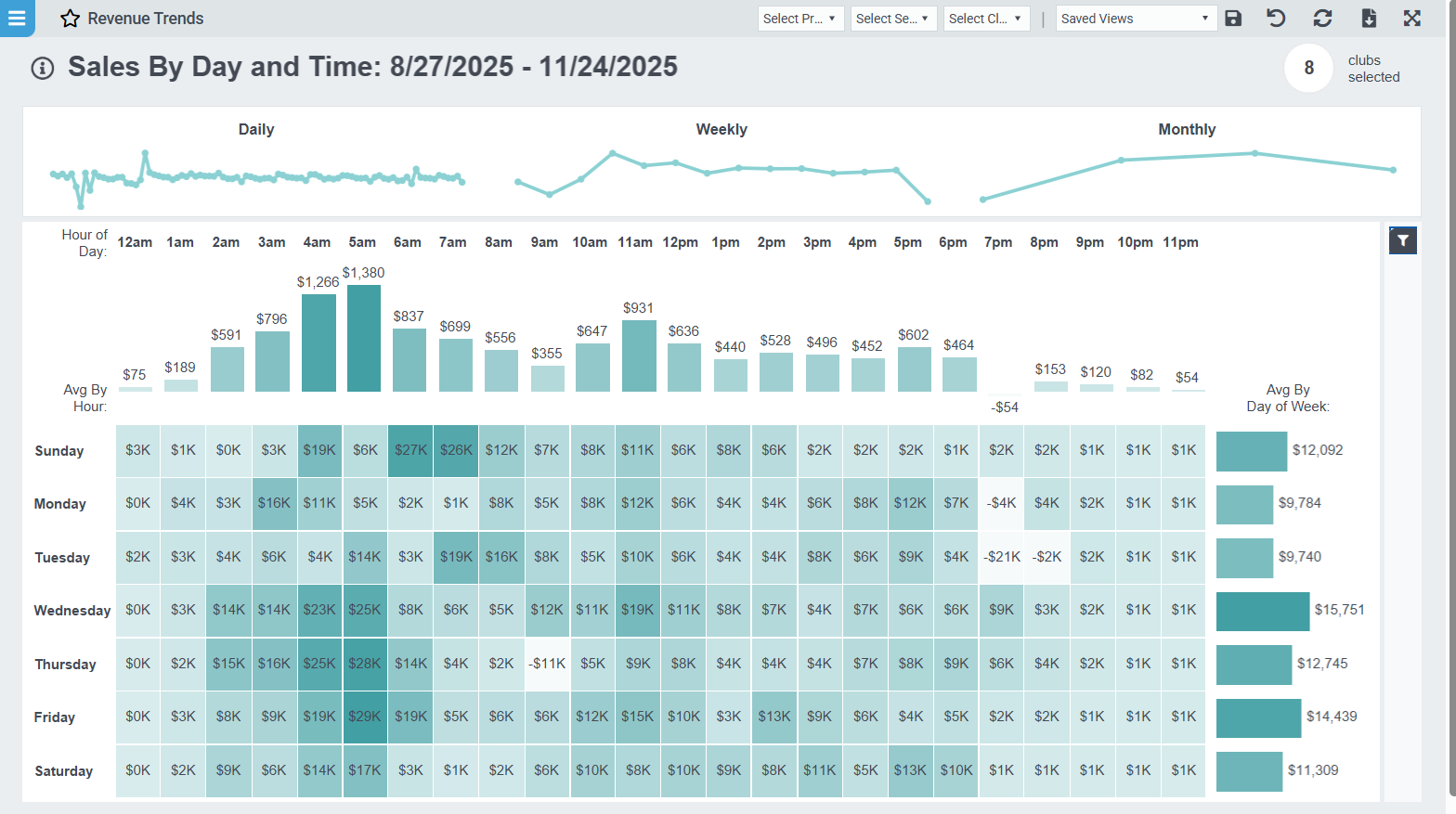
NEW! Revenue Trends > Sales by Day & Time dashboard tab
A new Sales by Day & Time tab has been added to the Revenue Trends dashboard. This enhancement helps you understand when sales activity is occurring across your business — both by day of the week and by time of day.
Tables can't be imported directly. Please insert an image of your table which can be found here.
Use this new view to:
- Identify peak sales hours and slow periods
- Optimize staffing and scheduling
- Understand member purchasing behavior patterns
NEW! Referral Insights Across Easalytics
We’ve expanded Easalytics’ member analytics with powerful new visibility into Referrals—helping you understand how referrals contribute to new membership growth and revenue, who your top referrers are, and when members are most likely to refer others. Currently we have referral data from ABC Fitness and Jonas member management systems.
These enhancements span multiple dashboards and introduce a brand-new Referral Program Analysis dashboard.
Member Mix & Membership Trends Referral Insights
We’ve expanded referral visibility across both New Member Mix and Membership Trends, giving you clearer insight into how referrals influence new membership growth and ongoing member behavior.
What’s Included:
- Ability to view counts and trends of Referred Members and Referring Members
- Addition of % of New Members Referred to topline metrics when the New Members metric is selected
- New metric Referred New Members, matching the New Members metric but filtered for referred members only
- New Segment and View By options for Referred / Not Referred members.
- Data table updates including Referred New Members and % of Members Referred, added after the New Members column
NEW! Member Referral Analysis dashboard
We’ve launched a comprehensive Referral Program Analysis dashboard that provides insights into your member referral program, referral-driven growth, top referrers, and referral behavior patterns. The dashboard includes both a Referral Analysis tab (with trends and a data table) and a Top Referrers tab with flexible filtering and date controls.
Metrics include:
- Referring Members Count
- % of Members Referring
- Referred New Members Count
- % of New Members Referred
- Referred New Dues
- % of New Dues Referred
- Referrals per Member
NEW! Trainer Performance Drilldown
We’re excited to introduce a new Trainer Performance Drilldown tab in the Trainer Performance dashboard—designed to give leaders and managers faster, deeper insights into how an individual trainer is performing across key operational and member-impact metrics.
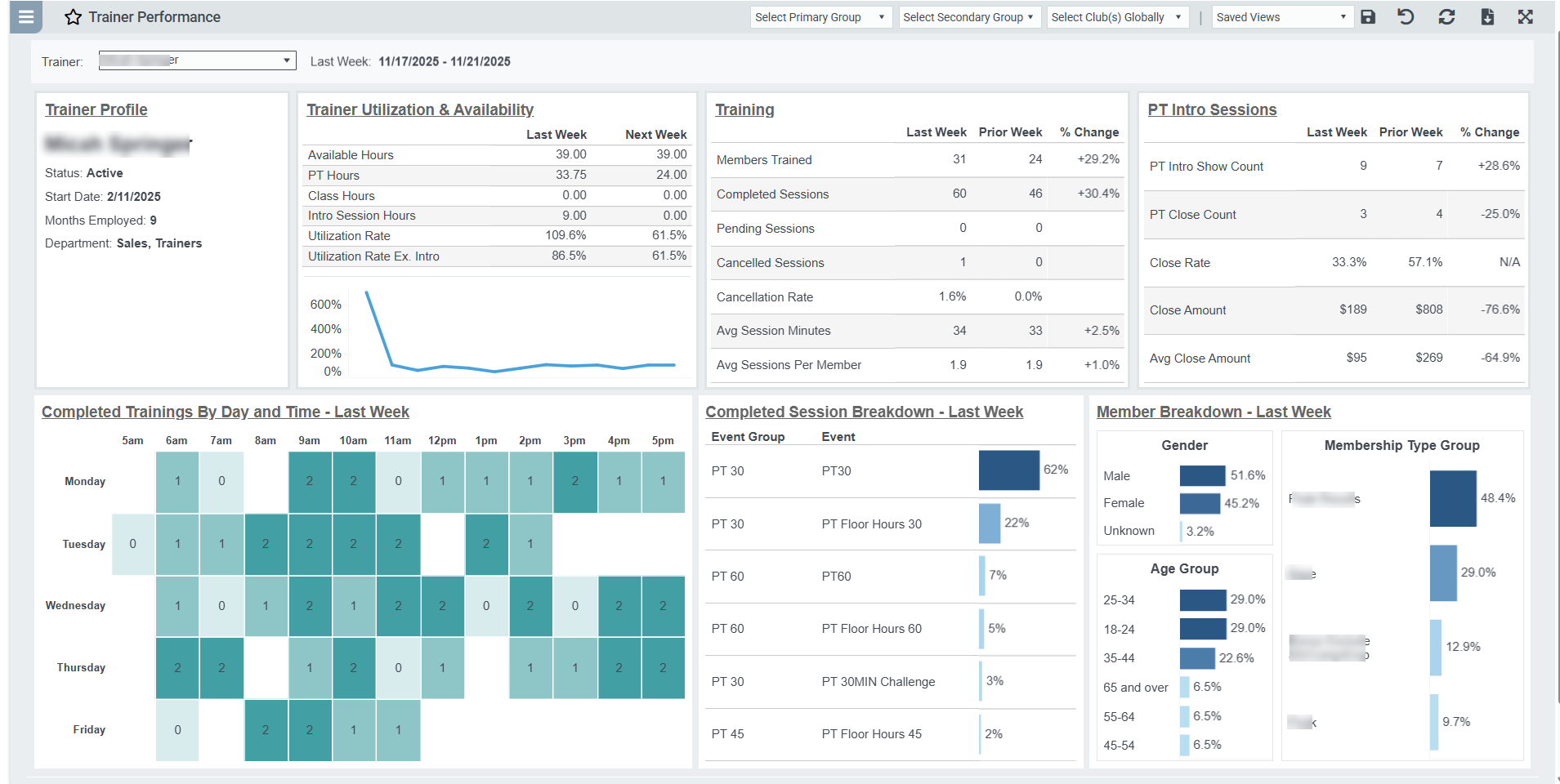
You can access the Drilldown simply by clicking a trainer’s name on the main Trainer Performance tab, or by opening the new tab directly and selecting a trainer from the dropdown. This enhancement makes it easier than ever to support coaching, staffing decisions, and overall training program performance.
Member Count Exclusion Enhancements
Our Member Count Exclusion feature is now more consistent and seamless across Easalytics. In this release, we’ve expanded how exclusion settings persist as you navigate through dashboards and member-level detail.
What’s New:
- Filter Persistence Across Dashboards: When you click into a dashboard from a filtered topline widget, your Member Count Exclusion setting now carries through automatically—ensuring the view you’re analyzing remains consistent.
- Filter Persistence to Member List: Navigating from any dashboard into the Member List will now retain your exclusion settings, so you see precisely which members were included (or excluded) in your analysis.
- Member Count Exclusion Added to Member List: The Member List now includes the Member Count Exclusion filter itself, giving you full control over reviewing or validating excluded groups directly at the member level.
These updates make Member Count Exclusion simpler, more transparent, and consistent across all navigation paths—so your filtered views always stay aligned with your reporting needs.
Club Activity YOY Enhancements
We’ve added new insights to the Club Activity YOY dashboard with a new Month-over-Month comparison option. Users can now toggle between Year-over-Year and MoM Change. On the performance Heatmap tab, users can also toggle between % Change and Actual Values. The Data Table has also been expanded to include MoM metrics alongside YOY.
These updates make it easier to move between YOY and MoM perspectives, compare performance across time periods, and gain a clearer understanding of what’s driving club activity changes.
💡 We love your feedback! Send ideas for new features, reporting, or improvements to support@easalytics.com.