
Description
This is the primary dashboard to look at your clubs' revenue. Easily see Revenue breakdowns for last month, MTD, YTD, and any time period, by Club, profit center group, and member segment. Also, quickly see the breakout between Dues revenue and Discretionary revenue, and what profit centers or member segments are driving the revenue performance.
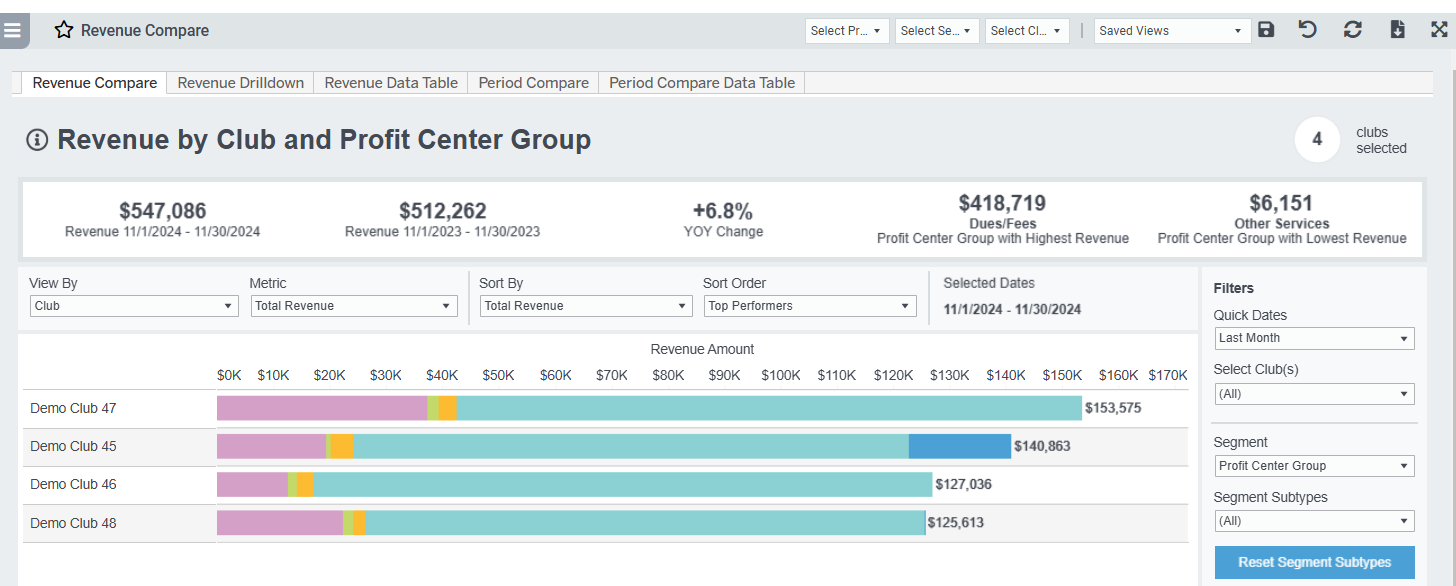
Use the Revenue Period Compare tabs to look at your revenue compared to last year, or any date range, and quickly sort by top and bottom performing clubs, profit centers, profit center groups, or member segments like age group, membership type, etc.
As always you can easily download the data or the graphs to add to presentations or do further analysis.
Practical Uses:
- Compare the revenue distribution by Membership Type for all clubs for the current year
- Compare the revenue for a specific profit center for 2 clubs last quarter
Metric Definitions
- Total Revenue: the sum of all Revenue payments of any type collected during the time period.
- Yesterday: The values shown for "Yesterday" will be the most recent data available, as indicated by the mm/dd/yyyy "data as of" date displayed under the metric. Please observe the date as in some circumstances the values shown may actually be 2 days prior.
- MTD: Sum of all Revenue payments of any type collected from the start of the calendar month to the mm/dd/yyyy "data as of" date displayed. Please observe the date as in some circumstances the values shown may actually be 2 days prior.
- Discretionary Revenue: the sum of revenue payments from profit centers marked in Easalytics Profit Center Group admin as Discretionary. The intention here is to separate mandatory spend by members for membership dues/fees from all other revenue that is 'discretionary' or optional.
- Dues/Fees Revenue: the sum of spend from members in profit center groups marked in Easalytics Profit Center Group admin as NOT discretionary.