
Description
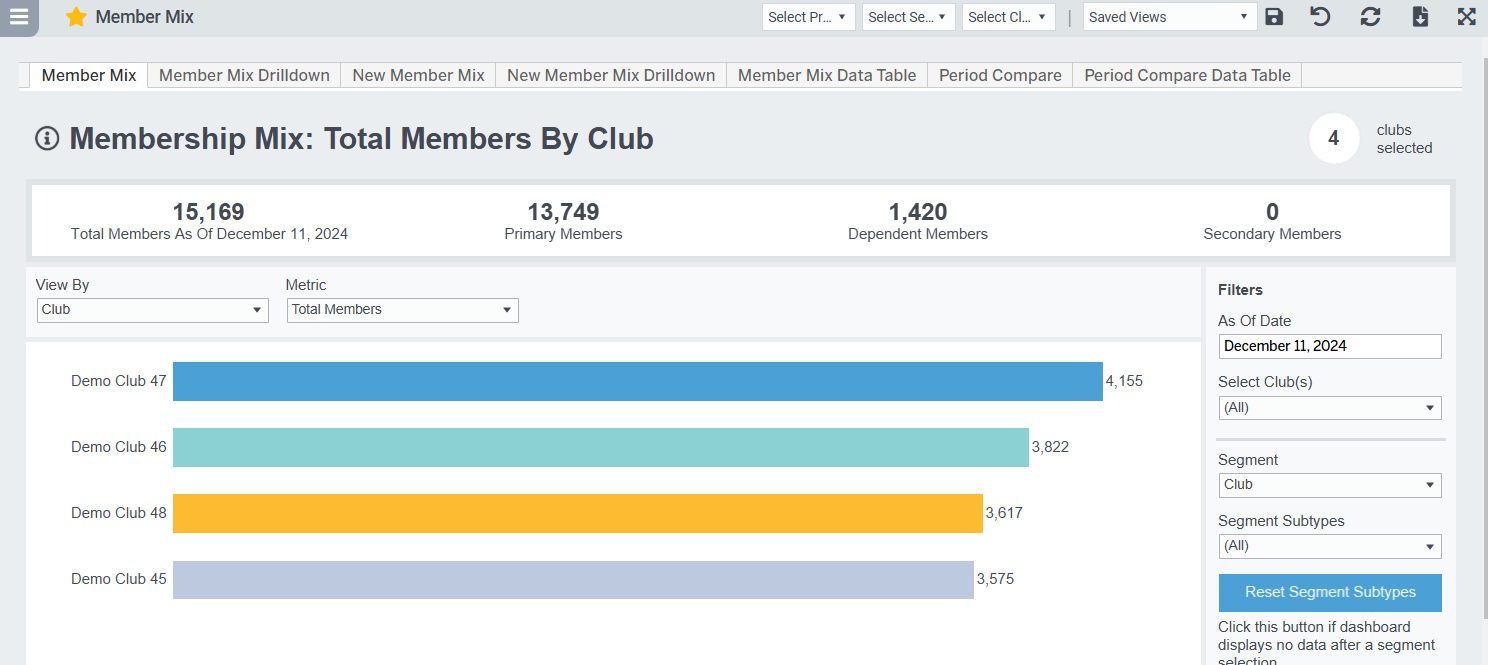
Compare active members month-to-date as of a specified date by demographic and engagement dimensions. Click the bars to drill in to see a full breakdown of member demographics, or go to Member List to see the individual members in that segment. Filter to Primary members to analyze Member Agreements. Note, Salesperson data has not been made available in reporting for total members, but find it on the New Member Mix tab.
Possible Uses
- Easy view of most/least total members by Membership Type, Membership Type Group, Club, and more
- Compare by segments including Club, Membership Type Group, Membership Type, Gender, Age Group, Payment Term, Average Monthly Check-ins, and Join Source
- Click to view a specific bar's membership breakdown by different segments
Metric Definitions
- Total Members: The count of all members in your club. Some dashboards may filter out members with certain statuses.
- Active Members: The count of all members in your club with an active status. Active statues differ by client. Contact Easalytics support for further information.
- Primary Members: Part of the Member Relationship field. Primary member is the main member on the account. Often it's the only member on the account, makes the payments, and holds the Membership Agreement.
- Secondary Members: Part of the Member Relationship field. Secondary Member and Dependent Member are basically the same and represent any additional members added to an account. Secondary members tend to be adults.
- Dependent Members: Part of the Member Relationship field. Secondary Member and Dependent Member are basically the same and represent any additional members added to an account. Dependent members tend to be children.
- Member Agreements: This is the equivalent of primary members. It's the number of agreements in the time period. In Easalytics we often talk about New Agreements.