
Release Notes November 7, 2024
In addition to performance improvements and bug fixes, the following visible updates were made:
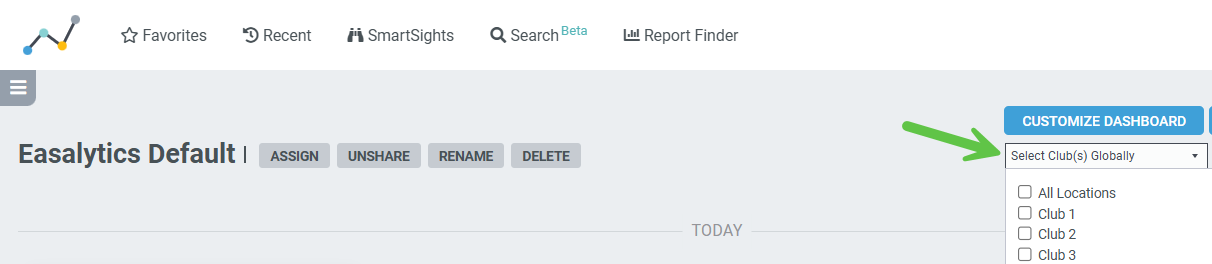
Homepage Topline Dashboards > Club Filter added
Now you can easily filter a homepage widget dashboard created for all your clubs down to just select clubs you care about. This will also help admin users to not have to create versions of each dashboard for each club location or club group.
NEW! Revenue Goals by Profit Center Group
Easalytics has added the ability to set and track revenue goals for your Profit Center Groups (PCGs)! If you have the Easalytics Goals product purchased, you will see changes in your Profit Center Group Admin page and the Goals Admin page, as well as on the Goals Lite dashboard and some new Goals homepage widgets.
In the Profit Center Group Admin page, you can select which of your Profit Center Groups you want to track goals and save your changes. Then, in the Goals Admin page you will have the ability to add or upload goals for each of your selected profit centers. Changes to goals will be reflected the following day in dashboards.
On the Goals Lite dashboard, you will see a new section below the original with your respective profit center groups, performance in the time period, and your % to goal.
For Homepage Topline widgets, we've added the below widgets to help you easily see your progress to goal. Each widget can be added to a topline dashboard multiple times, filtered to the respective Profit Center, Renamed and saved.
- Rev Goals by Profit Center Group Yesterday
- Rev Goals by Profit Center Group MTD
- Rev Goals by Profit Center MTD w/ Invoice Amt
- Rev Goals by Profit Center Yesterday and MTD
Personal Training Scorecard (Goals) > added % purchasing PT on Join Date
- Added columns showing the % of new member units that made any personal training purchase on their join date, and the % making a PT PIF purchase on their join date.
- This dashboard will now default to MTD instead of YTD when you view the dashboard
Member List Search
Tables can't be imported directly. Please insert an image of your table which can be found here.
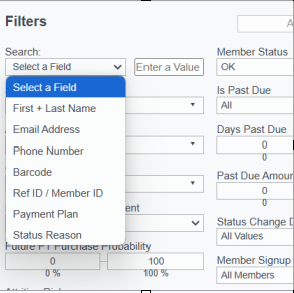
We've added the ability to search and filter Member List using keywords and text. This will allow you to create even more specific lists of members, or find a specific member.
Searching on First + Last Name, Email, Payment Plan and Status reason will return any results that contain the value you entered.
Searching Barcode, Member ID, Phone Number will return members matching the value entered exactly.
Check-ins By Day and Time
- We added a new Check-ins Period Compare tab that enables you to easily compare check-in behavior in one period vs another
- And the new Period Compare Data Table tab lets you download the comparison data for further analysis
Check-in Trends
- We added Quick Dates to more easily get to the date range you want to analyze.
- We also added Segments for Age + Gender and Age Generation
Membership Trends
- We added Quick Dates to more easily get to the date range you want to analyze.
- We consolidated the Daily and Monthly data table into the new Membership Data Table where you can pick daily, weekly, monthly or yearly data.
- We added a tab called Membership Mix Trends, where you can analyze the distribution of your membership, such as what % are Gen Z, and how that has changed over time. Use this as another tool to find useful trends in your membership data.
Salesperson Performance Dashboard
- We added a column for the % of New on ACH (also known as EFT or bank draft)
- On the View By: Salesperson, we added a tooltip showing the salesperson's activity across clubs
- On the View By: Club, we added a tooltip showing the club's performance by Salesperson
Forecast Monthly
- We added a filter to see just forecasted data, just historical, or both.
- we also added to the chart tooltips the YOY % change for the predicted and historical data for reference.
As always, please share any suggestions for enhancements, new reporting, and new ideas to support@easalytics.com